
Instagram profile optimization for a small business: name, bio, link, and highlights
Instagram profile optimization is the process of setting up each part of a profile so that visitors understand a business in seconds and know what to do next. It covers the photo, name, bio, link, and highlights.
A profile is often the first page a customer sees. This guide explains how to optimize an Instagram business profile in six steps, with a checklist and sample bios.
Key takeaways
- An optimized profile shows at a glance what the business does, who it serves, and what to do next.
- Clear photos, names, and usernames make a business easy to find and recognise.
- Good bios state what the business does, who it helps, why it stands out, and the next step.
- One clear link to a useful destination turns profile visits into inquiries or orders.
- Highlights act like a shop menu and answer common customer questions without a message.

What is Instagram profile optimization?
Instagram profile optimization means improving every visible part of a profile so it supports the business goal. The main parts are the profile photo, the name and username, the bio, the link, and the highlights.
A business profile has a different job from a personal one. Personal profiles express who someone is. Business profiles must tell a stranger what the business offers and how to buy.
Visitors decide quickly. Many leave within seconds if the profile is unclear. A well-optimized profile gives them reasons to stay, follow, and get in touch.
Why does a business profile need optimizing?
Every post, ad, and comment sends people to the profile. If the profile is unclear, the effort behind those posts is wasted.
An optimized profile also builds trust. A clear photo, a complete bio, and working contact options tell customers that the business is real and active.
In addition, a clear profile helps the right people find the business. A name and bio that mention what the business does match what customers search for.
How to optimize an Instagram business profile in six steps
Six steps cover every part of the profile. Work through them in order, and review the whole profile at the end.
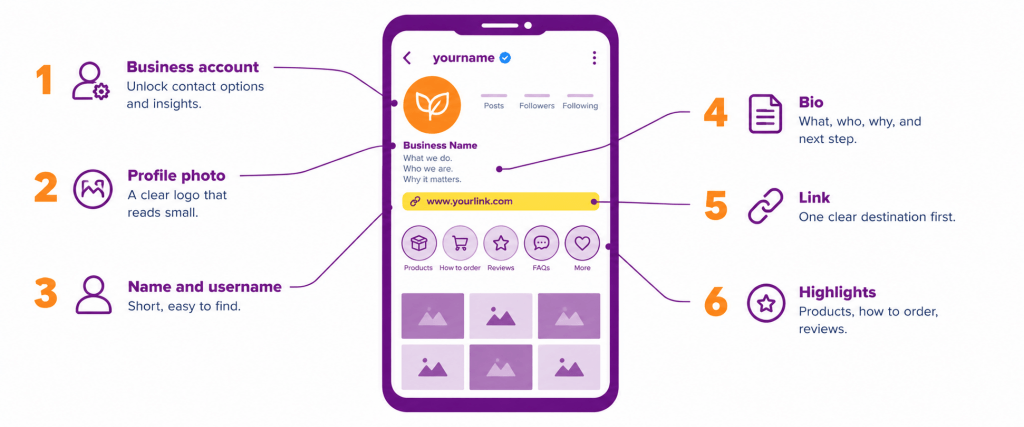
Step 1: Switch to a business account. A business account, which Instagram offers as a type of professional account, unlocks contact options and performance insights. Choose the category that best describes the business. deAsra’s guide to Instagram analytics explains how to use the insights.
Step 2: Choose a clear profile photo. Use the business logo or a clean brand image. The photo appears as a small circle, so keep it simple and easy to read at that size. Use the same image on every platform to build recognition. deAsra’s brand consistency guide explains why this matters.
Step 3: Set the name and username. The name should show the business name and, where space allows, what it does. The username should be short, easy to spell, and close to the business name. As of 2026, usernames can be up to 30 characters. Try to match the username used on other platforms.
Step 4: Write a clear bio. As of 2026, a bio can hold up to 150 characters, so every word must earn its place. Use this four-part formula: what the business does, who it helps, why it is different, and one call to action. Use line breaks to make it easy to scan.
Step 5: Add one clear link. Point the link to the place where a customer should go next. Good options include a WhatsApp chat, an inquiry page, or the business website. As of 2026, Instagram allows up to five links, so place the most important one first. Check that every link works on a phone. deAsra’s guide to creating a business website helps if a site is still missing.
Step 6: Create useful highlights. Highlights are saved Stories that stay on the profile under the bio. Group them by topic, give each a short name, and use a matching cover design. deAsra’s guide to using Instagram Stories shows how to create the Stories first.
What should a business bio include?
A bio works best when it follows a simple pattern. The table below breaks down the four parts.
| Part | What it says | Example wording |
| What you do | The product or service in plain words | Custom cakes baked to order |
| Who it is for | The customer or location | For families in City name |
| Why it stands out | The main point of difference | Eggless and same-day delivery |
| Call to action | The next step | DM to order |
Keep the language simple and avoid vague words. Emojis can help separate lines, but use them sparingly.
What do sample business bios look like?
The bios below are illustrative only. Replace every claim with one the business can prove. Each fits within the 150-character limit as of 2026.
| Business type | Illustrative bio |
| Home bakery | Eggless cakes baked to order. Same-day delivery in City name. DM to order. |
| Tailor | Custom stitching and alterations. Ready in 48 hours. Book on WhatsApp. |
| Tuition centre | Small batches for classes 8 to 10. Free demo class. Tap the link to book. |
| Handmade jewellery | Handmade jewellery for every budget. Shipping across India. Order in DMs. |
Each bio names the offer, the customer, a point of difference, and a clear next step.
Which highlights should a business create?
Highlights work like a menu on a shop wall. They let visitors find answers without sending a message. The table below shows a useful starting set.
| Highlight | What it shows | Why it helps |
| Products or services | Photos and short descriptions of what is on offer | Shows the range at a glance |
| How to order | The steps to place an order or book | Removes doubt and saves messages |
| Reviews | Screenshots or notes from happy customers | Builds trust |
| Offers | Current deals and seasonal specials | Gives a reason to act now |
| FAQs | Answers on delivery, payment, and returns | Handles common questions |
Update highlights every month, so the information stays current. Remove any highlight that is outdated.
How to use the grid to support the profile
The first rows of posts also shape the first impression. Pin your best posts to the top of the grid, so new visitors see strong examples first. Keep colours and photo styles consistent, so the profile looks like one brand.
A final check helps. Open the profile as a visitor would. Within five seconds, can a stranger tell what the business does, where it works, and how to contact it?
Instagram business profile checklist
Use the checklist below to review a profile before publishing or at the start of each month.
| Element | What to check | Done |
| Account type | Business account with the right category | Yes or no |
| Profile photo | Clear logo or brand image, readable at small size | Yes or no |
| Name | Business name, with what it does where possible | Yes or no |
| Username | Short, easy to spell, matches other platforms | Yes or no |
| Bio | Offer, audience, difference, and call to action | Yes or no |
| Contact options | Phone, email, or message option is active | Yes or no |
| Link | Most important link first and working | Yes or no |
| Highlights | Useful topics with matching covers and current content | Yes or no |
| Pinned posts | Best posts pinned at the top of the grid | Yes or no |
What mistakes should a business avoid?
A few common mistakes weaken a profile. The table below shows what goes wrong and what to do instead.
| Mistake | Why it hurts | Better approach |
| Using a personal account for the business | Contact options and insights are missing | Switch to a business account |
| A blurry or cluttered profile photo | The business is hard to recognise | Use a simple, high-contrast logo |
| A vague bio | Visitors do not know what the business offers | Follow the four-part formula |
| No link or a broken link | Interested visitors cannot take the next step | Add a working link and test it |
| Too many unnamed highlights | Visitors cannot find answers | Create a few clear, named highlights |
| Never updating the profile | Old offers and details confuse customers | Review the profile every month |
Conclusion
A well-optimized Instagram profile turns visitors into followers, inquiries, and customers. It tells people what the business does, who it serves, and what to do next.
The process is simple. Switch to a business account, pick a clear photo, set a strong name and username, and write a focused bio. Then add one useful link and create highlights that answer common questions.
Start this week by rewriting the bio with the four-part formula and testing the link on a phone. Small changes to the profile make every post work harder.
Your next step

Frequently asked questions
What is Instagram profile optimization?
It improves the profile photo, name, username, bio, link, and highlights. Visitors then understand the business quickly and know what to do next.
How to optimize an Instagram business profile?
Switch to a business account and choose a clear profile photo. Set a searchable name and username, write a focused bio, add one useful link, and create highlights. Review the profile every month.
What should a bio for an Instagram business include?
A business bio should say what the business does, who it helps, and why it is different. It should end with the next step. As of 2026, a bio can hold up to 150 characters.
How many links can an Instagram business profile have?
As of 2026, Instagram allows up to five links in the bio. Put the most important link first and check that each one works.
Which highlights should a business add?
Good starting highlights include products or services, how to order, reviews, offers, and frequently asked questions. Update them every month.