How to create an image with AI for your business: a simple guide to prompts and product visuals
To create an image with AI, you describe the picture in words, and an AI image generator produces it in seconds. Small businesses now use this to make posters, social posts, and product visuals without a studio.
The results depend on the quality of the description. This guide explains how to create an image with AI in six steps. It also covers prompts, product visuals, and the checks to run before publishing.
Key takeaways
- AI can turn a written description into an image in seconds, which saves time on posts, posters, and product visuals.
- A clear brief comes first. Know the purpose, the size, and the brand colours before writing a prompt.
- A good prompt names the subject, setting, style, lighting, and format.
- For product visuals, start from a real photo of the product. Change the background or scene, not the product itself.
- Always review the result, check the rules of the platform, and keep the image true to the real product.

What does it mean to create an image with AI?
An AI image generator is software that turns a text description into a picture. You type what you want to see. The software then produces one or more images that match the description.
Some tools also edit existing photos. They can remove a background, extend a scene, or place a product in a new setting. Both uses help a small business.
AI does not replace a business’s own photos of real products. It fills gaps, such as a festival poster, a blog banner, or a lifestyle scene around a product.
What can a small business use AI images for?
AI images work best where a business needs many visuals quickly. Common uses include the following.
- Social media posts, covers, and story backgrounds.
- Festival and offer posters.
- Blog banners and website graphics.
- Product scenes, such as a candle on a styled table.
- Ideas and mood boards before a real photo shoot.
deAsra’s guide to AI tools for social media marketing shows how these images fit into a posting plan.
How to create an image with AI in six steps
Six steps take you from idea to a finished image. Work through them in order.
Step 1: Decide the purpose and format. Start with the job of the image. Is it a social post, a banner, or a product scene? Then note the size and shape it needs, such as square, vertical, or wide.
Step 2: Gather your brand details. List the brand colours, the mood, and any real product photos. Having these ready keeps the image on brand. deAsra’s brand consistency guide explains why this matters.
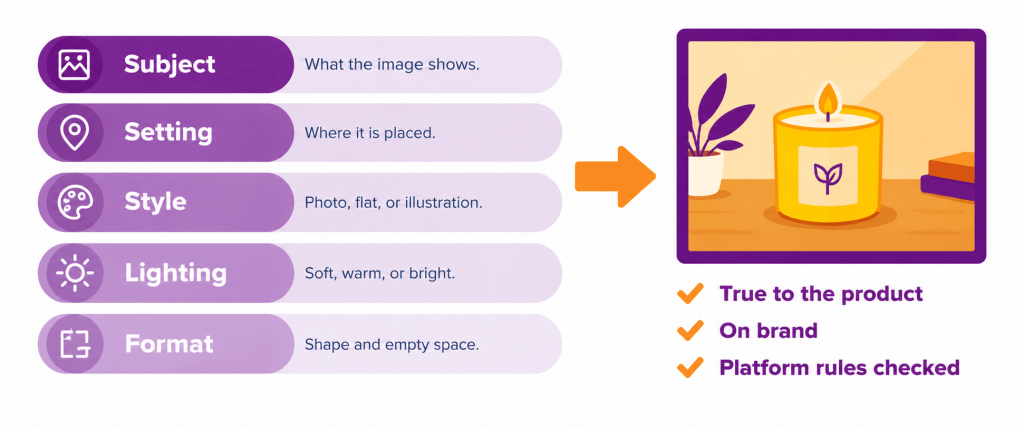
Step 3: Write a clear prompt. Describe the subject, the setting, the style, the lighting, and the format. The next section gives a simple formula.
Step 4: Generate several options. Create more than one version. Small changes in the wording lead to very different results. Pick the two or three closest to the brief.
Step 5: Refine and edit. Adjust the prompt to fix what is off. Then crop, resize, and tidy the chosen image. Add your logo, text, and offer details in an editing tool. Leave them out of the prompt, because AI often misspells words.
Step 6: Check and save. Review the image against the checklist in this guide. Save the final file with a clear name and note the prompt that worked. Reusing a good prompt saves time later.
How to write a prompt for an AI image generator?
A prompt for an AI image generator is a short photo brief. The more precise it is, the closer the result will be. Use the five parts below as a formula.
| Part | What to say | Example wording |
| Subject | What the image shows | A handmade soy candle in a clay jar |
| Setting | Where it is placed | On a wooden table near a window |
| Style | The look of the image | Realistic photograph, calm and warm |
| Lighting | The type of light | Soft morning light from the left |
| Format | Shape and space needed | Square, with empty space at the top |
Join the parts into one or two sentences. Add the brand colours if they matter. Keep the language plain and avoid long lists of unrelated ideas.
deAsra’s guide to writing better prompts offers more tips that also apply to images.
What do AI prompts for images look like?
Think of each AI prompt image request as a short brief to a photographer. The sample prompts below show the pattern. Replace the details with your own product and brand.
- A realistic photograph of a tiffin box on a kitchen counter, bright morning light, clean background, wide format with space on the left.
- Flat illustration of a festival sale poster background in warm orange and gold, no text, vertical format.
- Close-up photograph of handloom fabric folded on a cane table, soft natural light, calm mood, square format.
Notice that each prompt asks for no text. Add words later in an editing tool.
How to create product visuals with AI?
Product visuals need extra care, because customers buy what they see. The image must match the real product. Two approaches work well.
The first approach starts from a real photo. Take a clear photo of the product on a plain surface. Then use an AI editing tool to change the background or place the product in a styled scene. The product itself stays real.
The second approach generates a scene and places the product in it. Generate an empty table, shelf, or setting first. Then add the real product photo using an editing tool.
Follow these rules for every product visual.
- Show the true colour, size, and shape of the product.
- Do not add features, parts, or finishes the product does not have.
- Keep the same style across all products, so the catalogue looks like one brand.
- Check small details, such as hands, labels, and edges, for errors.
An image that misleads customers can lead to returns and lost trust. When in doubt, use the real photo.
How to keep AI images on brand?
AI images can look generic unless you guide them. Set a few fixed choices and repeat them in every prompt.
Use the same colour names, the same mood words, and the same type of background. Save a short style line, and paste it at the end of each prompt. For example, “warm tones, soft light, clean uncluttered background”.
deAsra’s guide to AI for small business marketing shows how visuals support wider marketing goals.
What should a business check before publishing an AI image?
Run a short check on every image before it goes live. The table below lists the key points.
| Check | Question to ask | Why it matters |
| Accuracy | Does it show the real product truthfully? | Customers expect what they see |
| Quality | Are hands, faces, text, and edges free of errors? | Errors look careless |
| Brand fit | Do colours and mood match the brand? | Builds recognition |
| Rights | Do the tool’s terms allow business use? | Avoids disputes later |
| Platform rules | Does the platform need a label for AI content? | Avoids removal of posts |
| Privacy | Does it show a real person’s likeness without consent? | Protects people and the business |
What mistakes should a business avoid?
A few common mistakes weaken AI images.
- Writing vague prompts and accepting the first result.
- Asking the AI to add logos or text, which often come out wrong.
- Showing a product that looks better than the real one.
- Using a different style for every post.
- Skipping the review for odd details.
Disclaimer on rights and rules
As of 2026, the rules on ownership and commercial use of AI-generated images differ by country and by tool. Platform policies on AI content also change often. Read the terms of any tool you use, and check the current rules of each platform where you post. This guide offers practical advice only and is not legal advice.
Conclusion
AI makes it easier for small businesses to produce good visuals quickly. The process is simple. Set the purpose, gather the brand details, write a clear prompt, and test several versions. Then refine the result and check it before publishing.
For products, start from real photos and keep every image truthful. A consistent style and a short review step keep the quality high.
Start this week with one image. Write a five-part prompt for your best-selling product scene. Create three versions, and pick the best one for your next post.
Your next step
Frequently asked questions
How to create an image with AI?
Describe the picture in a clear prompt that names the subject, setting, style, lighting, and format. Generate a few versions, refine the best one, and edit it. Check it before you publish.
What is a good prompt for an AI image generator?
A good prompt reads like a short photo brief. It names what the image shows, where it is placed, the style, the light, and the shape of the image. Plain, specific words work best.
Can AI make product images for a small business?
Yes. AI can change backgrounds and create styled scenes around a product. Start from a real photo and keep the product true to life.
Should I add text and logos inside the AI prompt?
No. AI often misspells words and distorts logos. Add text and logos afterwards in an editing tool.
Is it safe to use AI images for business?
It can be, if you follow the tool’s terms and each platform’s rules. As of 2026, these rules vary and change, so check them before publishing.