How to create a social media content calendar for a small business
A social media content calendar is a schedule that shows what to post, where to post it, and when. It turns scattered ideas into a clear plan, so a small team can post with purpose and stay consistent.
Many small businesses post when they remember and stop when they get busy. This guide explains how to create a social media content calendar in six steps, with content pillars and a sample weekly layout.
Key takeaways
- A social media content calendar is a simple plan of what to post, where, and when.
- Content pillars give the calendar a clear structure and keep posts varied.
- A posting rhythm you can sustain beats an ambitious one that fades.
- A calendar should include dates, formats, captions, visuals, owners, and status.
- Regular reviews show what works and keep the calendar flexible.

What is a social media content calendar?
A social media content calendar is a planning document that lists upcoming posts. It can be a spreadsheet, a shared document, or a planner app. The format matters less than the habit of using it.
A social media calendar usually shows the date, the platform, the topic, the format, and the person responsible. Some also include captions, visuals, and links.
It is different from a posting tool. A scheduling tool publishes posts at set times. A calendar decides what those posts should be.
Why does a small business need a content calendar?
Without a plan, posting becomes a daily scramble. The team spends time wondering what to share, and posts end up random. As a result, the feed looks unfocused.
A calendar saves time and reduces stress. Ideas are collected in advance, and work can be done in batches. In addition, it helps a business post consistently, which supports recognition and trust.
A calendar also links posts to goals. Each post has a purpose, such as education, trust, or sales.
How to create a social media content calendar in six steps
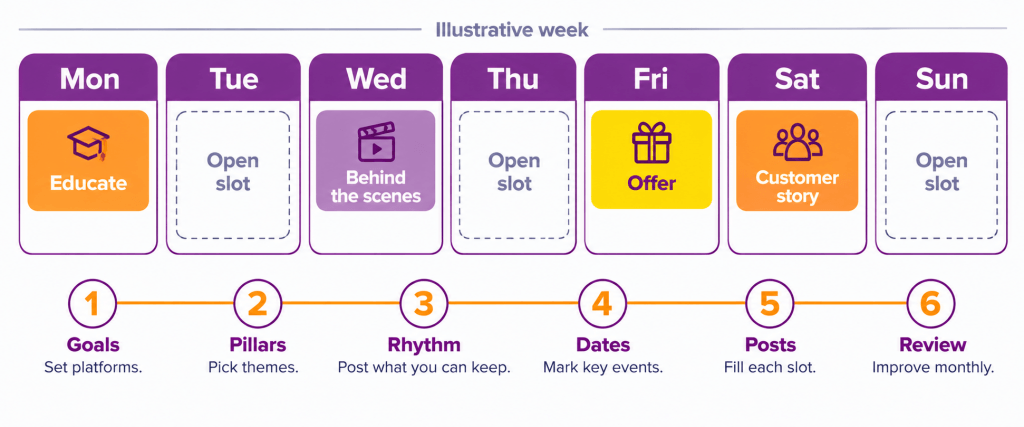
Six steps take you from goals to a working calendar. Work through them in order.
Step 1: Set goals and choose platforms. Decide what you want from social media, such as inquiries, followers, or orders. Then choose the platforms where your customers spend time. Fewer platforms done well beat many done poorly. deAsra’s social media audit guide helps you review what you have.
Step 2: Define content pillars. Pick three to five themes that your posts will return to. These pillars keep the content varied and on brand. The next section explains them.
Step 3: Choose a posting rhythm you can keep. Decide how often to post on each platform. Start with a small number, and raise it only if the team can sustain it. Consistency matters more than volume.
Step 4: Mark key dates. Add festivals, sales periods, launches, and events to the calendar first. Then plan posts around them. deAsra’s guide to the festival marketing calendar explains how to plan festival content.
Step 5: Fill in the posts. For each slot, write the topic, format, caption draft, visual, call to action, and owner. Fill the calendar for a month at a time. Leave a few open slots for timely posts.
Step 6: Schedule, publish, and review. Publish on the planned dates, by hand or with a scheduling tool. Review the results each month. Keep what works, change what does not, and update the calendar.
What are content pillars?
Content pillars are the main themes of your posts. They stop the feed from becoming a stream of sales messages. They also make planning easier, because every idea fits a pillar.
The table below shows common pillars and sample posts for a home bakery. Adapt them to your business.
|
Pillar |
Purpose |
Sample post |
| Educate | Share useful tips and answers | How to store a cake at home |
| Behind the scenes | Show people and process | A short clip of baking day |
| Products and offers | Show what you sell | A new flavour with ordering details |
| Customer stories | Build trust | A photo and thank-you note from a happy customer |
| Community and culture | Connect with your audience | A festival greeting or local event |
Use your own mix, and review it from time to time. If one pillar performs better, plan more of it.
How often should a small business post?
Posting frequency depends on the platform, the team, and the goals. There is no single right answer. Check your own platform insights to see when your audience is active, instead of relying on general claims.
A simple rule works well. Choose a rhythm you can keep for at least three months. For example, a small team might start with three posts a week on its main platform. Then it can adjust.
Quality should not drop to meet a number. A smaller number of good posts is better than many rushed ones.
What should a content calendar include?
A useful calendar has the same fields for every post. Include the following.
- Date and time of the post.
- Platform.
- Content pillar.
- Topic or idea.
- Format, such as image, short video, carousel, or story.
- Caption draft and call to action.
- Visual or file link.
- Owner and status, such as idea, draft, approved, or published.
Add or remove fields to suit your team. Keep it simple enough that people use it.
What does a sample weekly content calendar look like?
The layout below is illustrative only. It shows one week for a home bakery and works as a simple template. Change the days, formats, and pillars to match your business.
| Day | Platform | Pillar | Post idea | Format |
| Monday | Main platform | Educate | Tips for storing a cake | Image carousel |
| Wednesday | Main platform | Behind the scenes | Baking day clip | Short video |
| Friday | Main platform | Products and offers | New flavour and how to order | Image with caption |
| Saturday | Stories | Customer stories | A happy customer photo and thank-you | Story |
Repeat the pattern each week, and vary the topics. Over a month, the calendar will cover each pillar several times.
How to plan ahead and batch your work
Batching means doing similar tasks together. It saves time and keeps the quality steady.
Set aside one session each week or month for planning. Write all the captions in one go. Then, take photos and videos for several posts in one session. Finally, schedule the posts or set reminders.
deAsra’s guide to AI tools for social media marketing shows how AI can help with ideas and drafts. Always review the output before posting.
How to keep the calendar flexible
A calendar is a guide, not a cage. Leave a few open slots for news, trends, customer questions, and last-minute offers.
If a planned post no longer fits, replace it. Likewise, if a post gets strong engagement, plan a follow-up. deAsra’s guide to Instagram Stories offers quick ways to fill short-notice slots.
How to review your calendar each month
A monthly review keeps the calendar useful. Follow these steps.
- Check which posts got the most responses and inquiries.
- Note which pillars and formats worked best.
- Look at the posts that did poorly, and ask why.
- Compare results with your goals.
- Adjust the next month’s plan.
deAsra’s content marketing strategy guide shows how to connect social posts to wider content goals.
What mistakes should a small business avoid?
A few common mistakes weaken a content calendar.
- Planning more posts than the team can handle.
- Posting only sales messages.
- Skipping festival and event dates.
- Copying a competitor’s calendar without checking the audience.
- Leaving no room for timely posts.
- Never reviewing the results.
Conclusion
A social media content calendar makes posting calmer and more consistent. It gives every post a purpose and gives the team a clear plan.
The process is simple. Set goals and platforms, define pillars, and choose a rhythm you can keep. Then mark key dates, fill in the posts, and review each month.
Start this week by choosing three content pillars. Then plan the next seven days of posts, using the sample layout above.
Your next step

Frequently asked questions
What is a social media content calendar?
It is a schedule that shows what to post, on which platform, and when. It usually lists the topic, format, caption, visual, and owner for each post.
How to create a social media content calendar for a small business?
Set goals and choose platforms, define three to five content pillars, and decide on a posting rhythm you can keep. Mark key dates, fill in the posts, and review the results each month.
How often should a small business post on social media?
There is no single right number. Choose a rhythm your team can sustain for several months, and check your own platform insights for guidance.
What should a social media content calendar include?
Include the date, platform, content pillar, topic, format, caption, visual, owner, and status for each post.
Do I need a special tool for a content calendar?
No. A spreadsheet or a shared document works well. Scheduling tools can help later, but the plan matters more than the tool.