How to Use Instagram DMs for Customer Service and Sales
Instagram Direct Messages, or DMs, let a business respond to customer inquiries, share details, and close sales directly within the app, without the customer needing to switch platforms. For a small business already investing time in Instagram content, DMs are often where that content actually turns into a conversation and, eventually, a sale.
However, many small businesses treat Instagram purely as a content platform and let DMs pile up unanswered, or reply inconsistently. This guide covers how Instagram DMs differ from other messaging channels a business might use, and a practical approach to handling them for customer service and sales.
Key Takeaways
- Instagram DMs let a business respond to inquiries and share information directly within the app, capturing interest at the moment it happens.
- Instagram’s inbox separates messages into folders such as Primary and Requests, so checking only the Primary tab can mean missing genuine inquiries from accounts a business does not yet follow.
- Saved replies, available through Meta Business Suite, help a business respond quickly to common questions without retyping the same answer each time.
- Instagram DMs work well for the inquiries that start from a post, Story, or profile visit, while WhatsApp tends to suit ongoing, saved-contact conversations better.
- A slow or missed reply in DMs often means a lost sale, since the customer’s interest was tied to the specific content that prompted the message in the first place.

What Are Instagram DMs for Business?
Instagram DMs are private messages sent directly to a business’s Instagram account, separate from public comments or Story replies. For a business account, these often arrive from someone who has just seen a post, a Story, or a product tag and wants more information before deciding to buy.
This makes DMs different from a cold inquiry. A customer messaging through Instagram has usually just engaged with specific content, which means the context of that content is still fresh and relevant to how the business should respond.
Why Do Instagram DMs Matter for Customer Service and Sales?
Instagram DMs matter because they capture a customer’s interest at its most immediate point, right after they have seen something that made them want to ask a question or make a purchase. A delayed reply risks losing that interest to a competitor or simply to the customer moving on.
DMs also function differently from WhatsApp for a small business. Instagram DMs tend to receive first-time inquiries from people discovering a business through content, while WhatsApp is often used for ongoing communication with customers who already have a business’s number saved. Understanding this distinction helps a business decide where to focus responsiveness at each stage of a customer relationship.
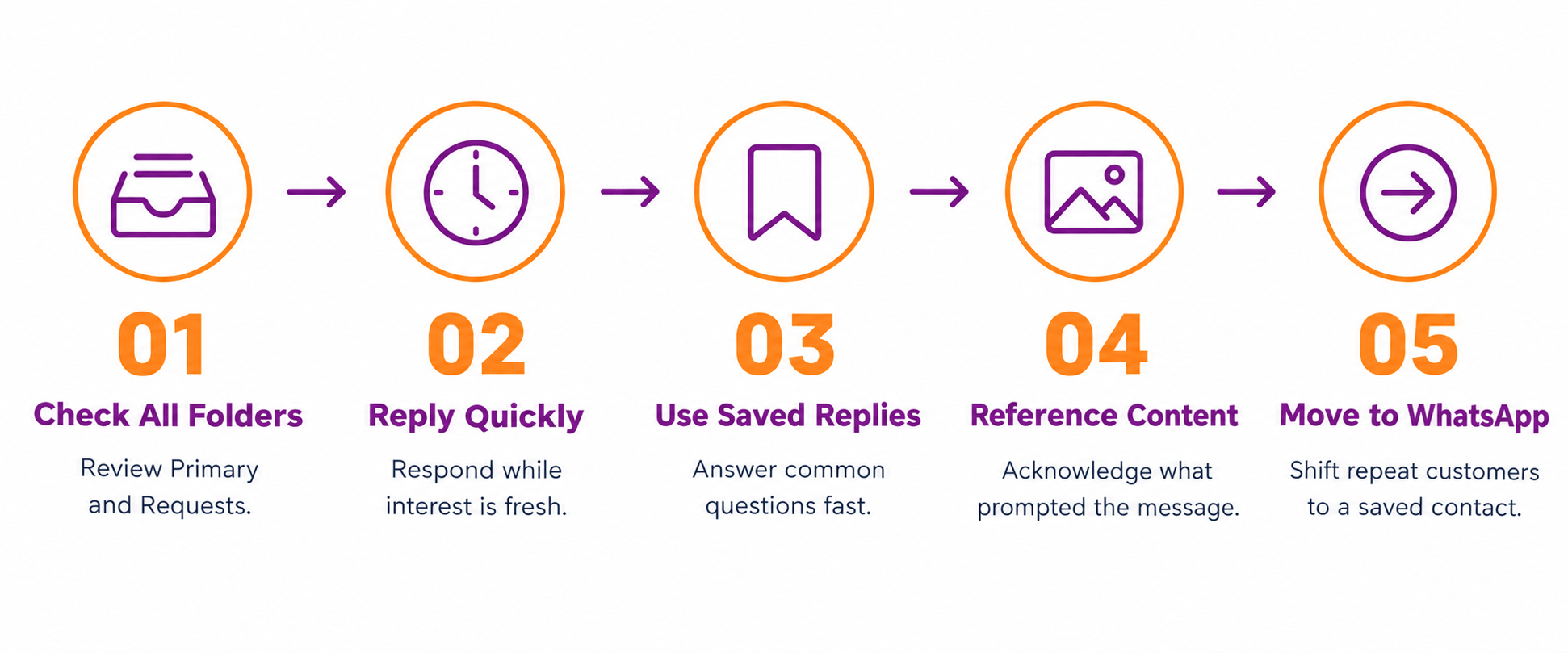
How to Use Instagram DMs for Customer Service and Sales in Five Steps
Handling Instagram DMs effectively follows a structure similar to any messaging-based sales channel, adapted to how Instagram’s inbox works.
Step 1: Check all inbox folders, not just Primary- Instagram separates messages into folders such as Primary and Requests, and messages from accounts a business does not yet follow can land in Requests, easily missed if only the Primary tab is checked regularly.
Step 2: Reply quickly to keep the customer’s interest- A customer who messages after seeing a Story or post is in a moment of active interest. A fast, even brief, acknowledgment keeps that interest alive while a fuller reply is prepared.
Step 3: Use saved replies for common questions- Meta Business Suite allows a business to save frequently used responses, such as pricing or availability information, which can be sent quickly without retyping the same answer for every similar inquiry.
Step 4: Reference the content that prompted the message- If a customer messages about a specific post or product, acknowledge it directly rather than replying generically. This shows attentiveness and avoids the customer having to re-explain what they are asking about.
Step 5: Move detailed or ongoing conversations to a saved contact where appropriate- For customers who are likely to order again, suggesting they save the business’s WhatsApp number for future orders can make repeat communication smoother than relying on Instagram DMs each time.
How Do Instagram DMs Differ from WhatsApp for a Small Business?
Both channels support direct customer communication, but they tend to serve different stages of the customer relationship. The table below breaks down the difference.
| Aspect | Instagram DMs | WhatsApp Business |
| Typical use case | First-time inquiries from content discovery | Ongoing communication with known customers |
| Discovery source | Post, Story, Reel, or profile visit | Referral, saved contact, or repeat customer |
| Best for | Answering questions prompted by specific content | Order confirmations, follow-ups, repeat orders |
| Message organisation | Primary and Requests folders | Labels for tracking conversation status |
| Broadcast capability | Limited compared to WhatsApp broadcast lists | Broadcast lists for reaching multiple saved contacts |
Using both channels for what they each do best, rather than relying on only one, tends to cover a small business’s messaging needs more completely.
Common Mistakes to Avoid with Instagram DMs
A few patterns consistently weaken how well Instagram DMs work for a small business. Checking only the Primary inbox and missing genuine inquiries sitting in Requests is one of the most common, since it can mean overlooking real customers simply because they have not followed the account yet.
Replying inconsistently, quickly on some days and not at all on others, is another common issue. Customers messaging through Instagram often expect a similarly fast response to what they would get through other messaging apps, and inconsistent reply times can noticeably affect conversion from inquiry to sale.
Conclusion
Instagram DMs give a small business a way to turn content engagement into direct conversation and, eventually, a sale. Checking all inbox folders, replying quickly, using saved replies for common questions, and referencing the content that prompted the message all make DMs a more effective part of a small business’s customer communication.
Therefore, start by checking the Requests folder regularly alongside Primary, and set up a few saved replies for the questions asked most often through DMs.
However, DMs work best as part of a broader messaging approach, alongside WhatsApp for ongoing customer relationships, rather than as the only channel a business relies on for every stage of communication.
Your Next Step

Frequently Asked Questions
How to use Instagram DMs for business customer service?
Check both the Primary and Requests inbox folders regularly, since genuine inquiries from accounts that do not yet follow the business can land in Requests. Reply quickly to keep the customer’s interest, use saved replies for common questions, and reference the specific post or Story that prompted the message when responding.
What is the difference between Instagram DMs and WhatsApp for business?
Instagram DMs tend to handle first-time inquiries from people discovering a business through content such as posts, Stories, or Reels. WhatsApp Business is generally better suited to ongoing communication with customers who already have the business’s number saved, including order confirmations and repeat orders.
How to reply faster to Instagram DMs for a small business?
Setting up saved replies through Meta Business Suite for frequently asked questions, such as pricing or availability, allows a business to respond quickly without retyping the same answer each time. Checking the inbox regularly, including the Requests folder, also reduces delayed replies to genuine inquiries.
Can Instagram DMs be used to close sales directly?
Yes. A customer messaging about a specific product or post can be given pricing, availability, and next steps directly within the DM conversation. For customers likely to order again, moving the ongoing relationship to a saved WhatsApp contact can make repeat communication smoother going forward.
Why do some Instagram messages not appear in the main inbox?
Instagram separates messages into folders such as Primary and Requests. Messages from accounts that do not yet follow the business, or that Instagram considers less likely to be relevant, can land in Requests rather than Primary, which is why checking both folders regularly matters.