How to create a business website: a step-by-step guide
A business website is a set of web pages under one address that tells customers who a business is and how to reach it. It works around the clock, even when the shop is closed.
Creating one does not need coding skills. This guide explains how to create a business website in seven steps, from picking a domain name to testing before launch.
Key takeaways
- A business website needs a clear goal first, such as inquiries, orders, or product display.
- A short, easy-to-spell domain name makes the site simple to remember and share.
- Most small businesses can start with a website builder or a content management system, without a developer.
- Five core pages cover most needs: home, about, products or services, contact, and a short FAQ.
- Testing on a phone and a laptop before launch prevents most early problems.

What is a business website, and why does a small business need one?
A business website is the official online home of a business. It lists what the business offers, shows proof of quality, and gives customers a way to get in touch. Social media pages can do some of this, but a website belongs to the business alone.
A website also builds trust. Customers often search for a business name before they call or visit. A clear site tells them the business is real and active.
In addition, a website keeps working after the working day ends. A visitor can read about products, check opening hours, or send an inquiry at any time.
What should a business website include?
Most small business websites need only a few pages. Each page should answer one question a customer is likely to ask.
| Page | What it should include | Question it answers |
| Home | A one-line description of the business, key offers, and a clear contact button | What does this business do? |
| About | The owner’s story, location, and what makes the business different | Who is behind this business? |
| Products or services | Clear descriptions, photos, and how to order or book | What can I buy here? |
| Contact | Phone number, WhatsApp link, address, map, and opening hours | How do I reach the business? |
| FAQ | Short answers to common questions about orders, delivery, and returns | What should I know before buying? |
Add a customer reviews section or a blog later, once the core pages work well. If the site collects visitor details through a form, also publish a short privacy note that explains how the details are used.
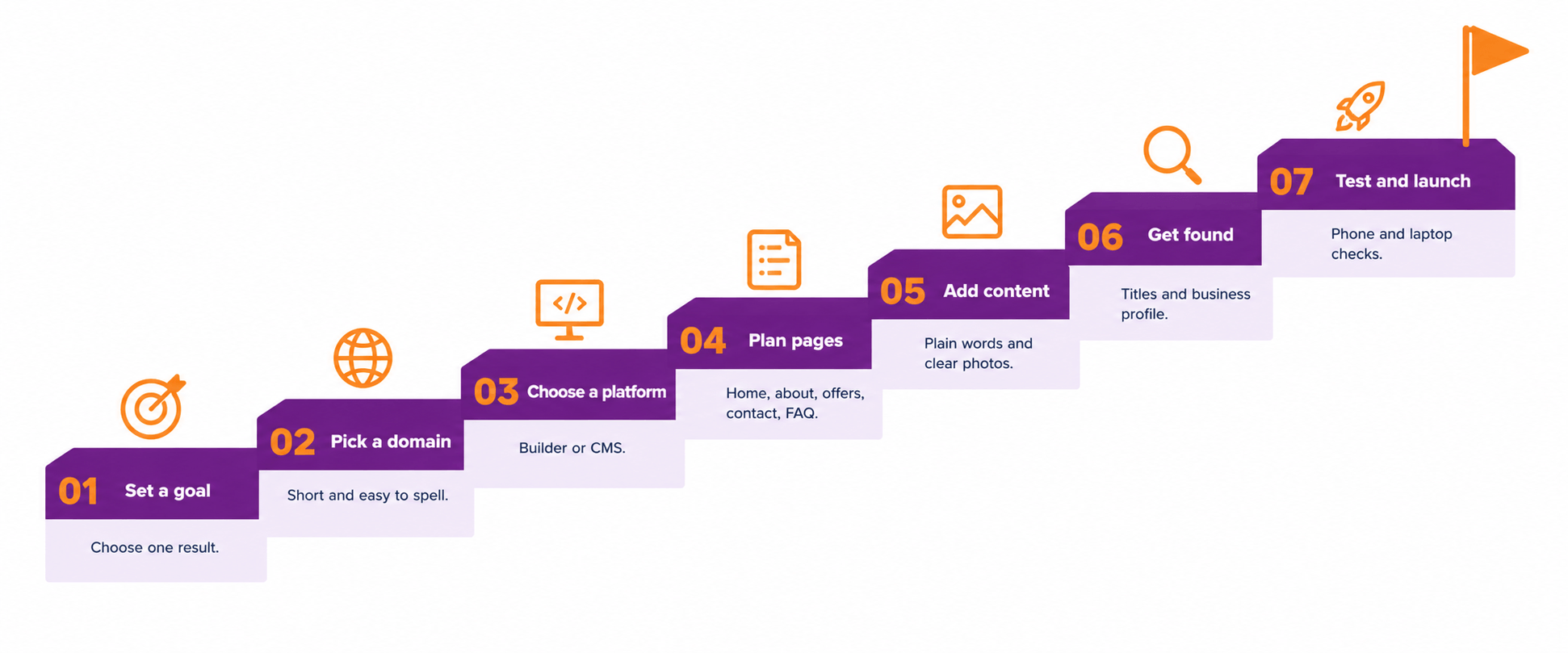
How to create a business website in seven steps
The seven steps below take a site from idea to launch. Each step builds on the one before it.
Step 1: Set one clear goal. Decide what the website must do first. Common goals are to bring in inquiries, take online orders, or show a product range. A clear goal decides which pages and buttons the site needs.
Step 2: Choose a domain name. A domain name is the web address customers type to reach the site. Keep it short, easy to spell, and close to the business name. Avoid hyphens and numbers, since they are easy to mistype. A .in domain suits businesses serving customers in India, while .com has wider recognition. Search first to make sure no similar business already uses the name.
Step 3: Pick hosting and a platform. Hosting is the online space where the website files live. The platform is the system used to build and edit the pages. Many website builders include hosting in one package. The comparison table in the next section shows the main options.
Step 4: Plan the pages. Sketch the page list on paper before building anything. Start with the core pages in the table above. Keep the menu to five or six items so visitors find what they need quickly.
Step 5: Write content and add images. Write in plain language about what the business sells and who it serves. Lead with the customer’s need, not the owner’s history. Use clear photos of real products or work. Compress images before uploading them, since heavy files slow the page. Show the phone number, WhatsApp link, and address on every page.
Step 6: Set up basic search visibility. Give each page a clear title and a short description that name the main topic. Use the business name, address, and phone number in the same form everywhere online. Then claim a Google Business Profile so nearby customers can find the business on Maps. deAsra’s guide to Google Business Profile explains the process.
Step 7: Test and launch. Open every page on a phone and on a laptop. Click every button and link. Submit the contact form and confirm the message arrives. Check that the address starts with https, because browsers may warn visitors about sites without it. Launch only after these checks pass.
Which platform should a small business choose?
The right platform depends on budget, time, and how much control the owner wants. The table below compares the three common routes.
| Route | Best for | Effort to start | Flexibility |
| Website builder | Owners who want a simple site quickly, using ready-made templates | Low | Limited to the template options |
| Content management system | Owners who plan to add a blog, many pages, or extra features | Medium | High, with plug-in features |
| Custom development | Businesses with special features or a developer on the team | High | Very high |
For most small businesses, a website builder is the easiest start. Move to a content management system later if the site outgrows the template. Pricing varies by provider and changes often, so compare current plans before deciding.
How to make a business website easy to find
A website helps only if customers can find it. Three habits make a big difference, even without paid ads.
First, match each page to a question customers search for. A bakery page titled “Custom birthday cakes in Pune” is clearer than one titled “Our products”. Second, keep the business details consistent across the site and on every online listing. Third, ask happy customers for reviews on the business profile.
deAsra’s local SEO guide explains how to rank on Google without ads. A short contact button linked to WhatsApp also helps visitors reach the business quickly.
How to design a website that customers trust
Good design for a small business is simple design. Use one or two fonts and a few brand colours. Leave white space around text so the page is easy to read.
Make sure the site works well on a phone, since customers often browse that way. Place the contact button where visitors can see it without scrolling. Finally, remove anything that does not help a visitor decide, such as long welcome messages or unrelated banners.
How to keep a website working after launch
A website needs light, regular care. Set a monthly reminder to check a few basics.
- Confirm that prices, opening hours, and contact details are correct.
- Test that links and the contact form still work.
- Add new photos, offers, or customer stories.
- Review the inquiries received and note which pages brought them.
deAsra’s digital marketing audit guide shows how to review results in a structured way.
What mistakes should a small business avoid?
Most early website problems come from a few common mistakes. The table below shows what goes wrong and what to do instead.
| Mistake | Why it hurts | Better approach |
| No clear goal | Pages feel scattered and visitors leave | Set one goal before building |
| Hard-to-spell domain name | Customers mistype the address | Choose a short, simple name |
| Too many pages at launch | The site is slow to finish and hard to maintain | Start with five core pages |
| Hidden contact details | Interested visitors cannot reach the business | Show contact details on every page |
| Heavy, uncompressed images | Pages load slowly | Compress images before upload |
| Skipping the phone test | Many visitors see a broken layout | Test on a phone before launch |
Conclusion
A business website gives a small business a home that it controls. It builds trust, answers customer questions, and keeps working after closing time.
The process is simple. Set a goal, pick a short domain, choose a platform, plan the pages, write clear content, add basic search details, and test before launch.
Start this week by writing down the website goal and the five core pages. A simple site that is live beats a perfect site that never launches.
Your next step

Frequently asked questions
How to create a business website step by step?
Set a goal, choose a domain name, and pick hosting and a platform. Then plan the pages, write the content, set up basic search details, and test on a phone and a laptop before launch.
How to build a website for a small business without coding?
Use a website builder or a content management system with ready-made templates. Both let owners add text, photos, and buttons without writing code. Choose a template that suits the business and edit it page by page.
What pages does a small business website need?
Five pages cover most needs: home, about, products or services, contact, and FAQ. Add reviews or a blog once the core pages work well.
Which platform is best for a small business website?
A website builder is the easiest start for most owners. A content management system suits businesses that plan to add many pages or features. Custom development suits special needs and needs a developer.
How can a small business website get found on Google?
Give each page a clear title and description, keep business details consistent online, and claim a Google Business Profile. Customer reviews and regular updates also help over time.