AI in recruitment process: how a small business can use it well
Hiring takes time that small business owners rarely have. AI can speed up parts of the recruitment process, such as writing job descriptions, sorting applications, and preparing interview questions.
AI can also make unfair or wrong calls when nobody checks its work. This guide explains how to use AI in hiring, stage by stage. It also shows where a person must stay in charge.
Key takeaways
- AI helps with drafting, sorting, and scheduling, but it should not make the hiring decision.
- Define the role and your selection criteria before you use any AI tool.
- Use AI to draft job descriptions and interview questions, and then edit them yourself.
- Review AI screening results, including a sample of the people it rejected.
- Handle candidate data with care, and confirm legal points with a professional.

How is AI used in the recruitment process?
AI in recruitment means using software that can draft text, sort information, and suggest options to support hiring tasks. Typical tasks include writing job ads, finding candidates, screening applications, and scheduling interviews.
For a small business, AI works best as an assistant. It saves time on repeated, text-heavy tasks. A person still decides who to interview and who to hire.
Where can AI help at each stage of hiring?
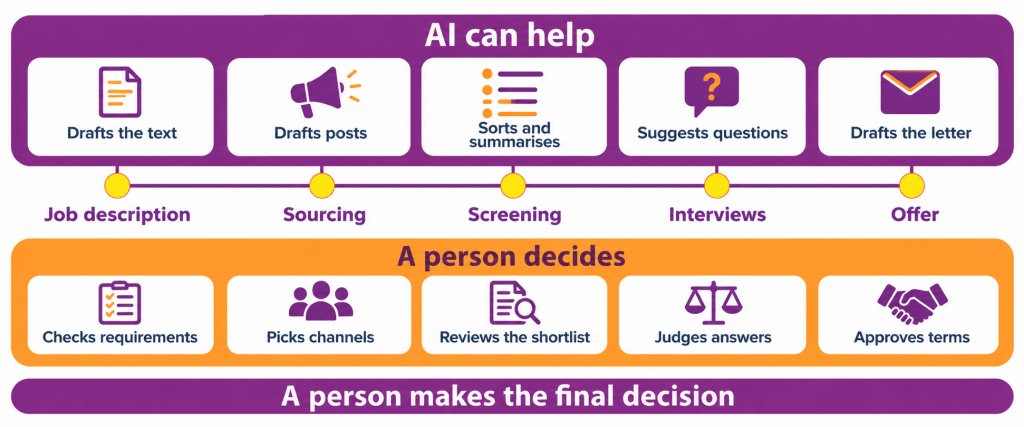
The table below shows where AI can help in the recruitment process, and what a person must still do.
| Stage | How AI can help | What a person must still do |
| Job description | Draft the text and simplify the language | Check that every requirement is real and necessary |
| Sourcing | Draft job posts and outreach messages | Choose the channels and personalise the message |
| Screening | Sort applications against your criteria and summarise them | Review the shortlist and check some rejected applications |
| Interviews | Suggest question lists and help with scheduling | Run the interview and judge the answers |
| Offer and onboarding | Draft offer letters and welcome messages | Approve the terms and hold the conversation |
For the last stage, see deAsra’s onboarding guide.
How to use AI in hiring: step by step
Follow these six steps to use AI in hiring without losing control of the process.
Step 1: Define the role and your criteria first. Write down the skills, experience, and qualities the role needs. Separate the must-haves from the nice-to-haves. Clear criteria give both you and the AI something fair to work from.
Step 2: Draft the job description with AI. Give the AI the role, the tasks, and your criteria. Then edit the draft. Remove requirements that are not truly needed, and keep the wording plain and inclusive. The ChatGPT prompts guide can help you write clear instructions.
Step 3: Widen your reach. Ask AI to draft job posts for different channels, and short messages to reach possible candidates. Check each message before you send it, so that it sounds like your business.
Step 4: Screen with care. AI resume screening can sort applications against your criteria and summarise each one. Do not let it reject people automatically. Review the shortlist yourself, and read a sample of the rejected applications too.
Step 5: Prepare interview questions. Ask AI to suggest role-specific questions based on your criteria. Edit them, and then ask every candidate the same core questions, so that you can compare answers fairly. These are questions you ask candidates, not questions about AI.
Step 6: Keep a person in the final decision. Record the reasons for each decision in your own notes. Tell candidates the outcome promptly and politely.
What are the risks of AI in hiring?
AI can repeat patterns from the data it learned from, and it can state things that are not true. In hiring, that can mean unfair results or wrong summaries. The table below pairs each risk with a safeguard.
| Risk | Safeguard |
| Unfair results for some groups | Review rejected applications, and keep a person in the decision |
| Wrong or invented details in summaries | Check key facts against the original CV |
| Candidate data shared too widely | Share only what is needed, and check how the tool stores data |
| Over-reliance on the tool | Use AI for drafts and sorting, not for the final call |
| Poor candidate experience | Respond to every candidate, and be open about how you use AI |
How do you choose an AI tool for recruitment?
Many AI tools for recruitment exist, and they change quickly. Instead of chasing names, ask a few plain questions of any tool you consider.
- What exactly does it do in the hiring process?
- Can you see why it ranked one candidate above another?
- Where is candidate data stored, and who can access it?
- Can you turn off automatic rejection?
- Can you export or delete candidate data when you need to?
Start with a free or low-cost trial on a real but low-risk role. For broader ideas, see deAsra’s list of AI tools for small business.
How should you handle candidate data?
CVs hold personal details, so treat them with care. Collect only what you need. Tell candidates how you will use their data, and delete it when you no longer need it.
As of 2026, India’s Digital Personal Data Protection Act, 2023 and the DPDP Rules, 2025 are being phased in. Most of the substantive provisions are scheduled to apply from 14 May 2027. The Press Information Bureau summary of the DPDP Rules, 2025 explains the framework.
Disclaimer: This guide is general information and is not legal advice. Employment law and data protection rules apply to hiring, and they change. Confirm the requirements for your business with a qualified professional.
What mistakes should you avoid?
- Using AI before you have written clear criteria for the role.
- Letting a tool reject candidates without any human review.
- Copying an AI-written job description without editing it.
- Asking different candidates different questions.
- Sharing candidate details with a tool you have not checked.
Conclusion
AI can make the recruitment process faster for a small business. It drafts job ads, sorts applications, and prepares interview questions. It cannot replace your judgement about people.
Keep the process simple. Define the role first, use AI for drafts and sorting, and review its results. Then make the final decision yourself, and protect candidate data throughout.
Choose one open role this week and write its criteria. Then use AI to draft the job description, and edit it before you post.
Your next step

Frequently asked questions
How to use AI in the recruitment process?
Define the role and criteria first. Use AI to draft the job description, widen your reach, sort applications, and prepare interview questions. Review the results, and make the final decision yourself.
Can AI replace a recruiter or the owner in hiring?
No. AI can save time on drafting and sorting, but a person must judge candidates and make the decision. AI can also make mistakes or reflect unfair patterns.
Is AI resume screening fair?
It can be, if you use clear criteria and check the results. Review the shortlist and a sample of rejected applications, and do not allow automatic rejection.
Which AI tools for recruitment should a small business use?
Tools change quickly, so judge them by what they do. Look for clear explanations of results, safe handling of candidate data, and the option to switch off automatic rejection.
How can AI help prepare interview questions?
Give the AI the role and your criteria, and ask for role-specific questions. Edit the list, and then ask every candidate the same core questions so that answers can be compared fairly.