How to make reels on Instagram: a simple guide for small businesses
A Reel is a short vertical video that you create and share on Instagram. Reels can be shown to people beyond your followers, which makes them useful for reaching new customers.
Many small business owners hold back because video feels hard. It does not need to be. This guide explains how to make reels on Instagram in six steps, with simple Reel ideas and the size rules as of 2026.
Key takeaways
- A Reel is a short vertical video, and a phone is enough to make one.
- Start with one idea, one goal, and a strong opening moment.
- Film vertically, keep clips short, and add on-screen captions.
- As of 2026, Instagram asks for at least 30 frames per second and 720 pixels of resolution.
- Post regularly, reply to comments, and review the results.

What are Instagram Reels and why use them for business?
Instagram Reels are short videos that can include music, text, and effects. They appear in a dedicated Reels area of the app, and they can also show up on your profile.
For a small business, Reels offer three benefits.
- Your product, your process, and your team come to life in action.
- New people get a chance to discover you.
- Reels are quick to make with a phone, and no studio is needed.
This guide focuses on how to make a Reel. For the wider plan, see deAsra’s Instagram Reels marketing guide.
What do you need before you start?
You need very little. A few simple items will lift the quality.
- A smartphone with a working camera.
- Natural light from a window, or a plain lamp.
- A steady surface or a small stand, so the video does not shake.
- Some idea of what you want to show.
- Quiet surroundings, if you plan to speak.
How to make reels on Instagram: step by step
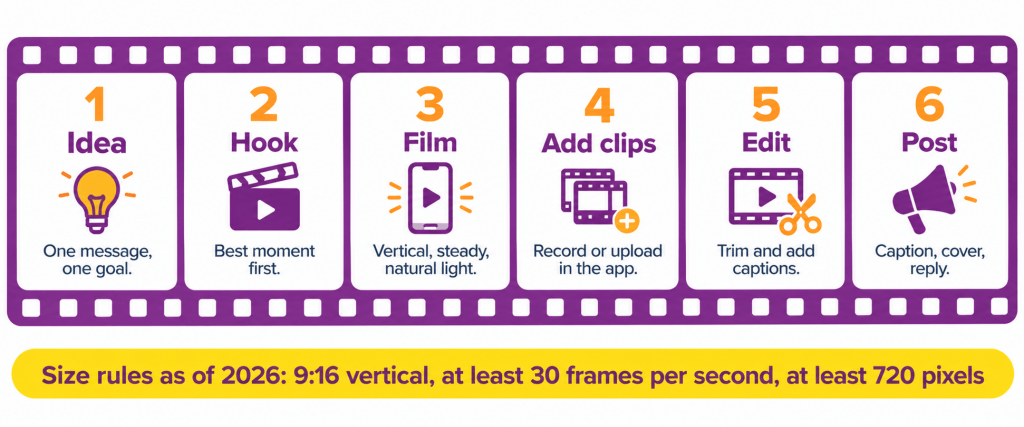
Follow these six steps to make a Reel from idea to post.
Step 1: Choose one idea and one goal. Pick a single message, such as showing how a product is made. Decide what you want viewers to do next, such as visit your profile or send a message.
Step 2: Plan a strong opening. Start with the most interesting moment, so viewers have a reason to keep watching. Then list three to five short shots, in the order you will film them.
Step 3: Film in vertical. Hold the phone upright and keep key subjects in the centre of the frame. Use short clips, steady hands, and natural light.
Step 4: Add your clips in the app. In the Instagram app, choose the option to create a Reel. Then record new clips or upload the ones you have filmed.
Step 5: Edit and add captions. Trim each clip so that nothing drags. Add short on-screen text, because some viewers watch without sound. If you add music, check which audio is available to business accounts, since some tracks are restricted for commercial use.
Step 6: Write a caption, choose a cover, and post. Add a short caption with a clear next step. Choose a cover image that looks good on your profile, and then share the Reel. Reply to comments soon after posting.
What are the Instagram Reels size and format rules?
Platform rules change, so confirm them in the app before you post. As of 2026, Instagram’s Help Center states a few basic requirements. The table below sets them beside a practical choice.
| Setting | Instagram’s stated rule | Practical choice |
| Aspect ratio | Between 1.91:1 and 9:16 | 9:16 vertical, which fills the phone screen |
| Frame rate | At least 30 frames per second | 30 frames per second |
| Resolution | At least 720 pixels | 1080 by 1920 pixels, as many guides recommend |
| Length | Limits have changed more than once | Check the limit in the app, and keep Reels short and focused |
You can read the full rules on the Instagram Help Center page for Reels resolution and size.
What Reel ideas work for small businesses?
Good Reels show something real. The table below lists six formats with illustrative examples.
| Idea | What to show | Example |
| Behind the scenes | How a product is made | A baker shaping dough |
| Quick how-to | One useful tip | A tailor showing how to measure a sleeve |
| Customer question | A clear answer to a common question | A shop owner explaining delivery options |
| Before and after | A visible change | A dull brass lamp polished until it shines |
| Product in use | The product in daily life | A bag packed for a day out |
| Team introduction | A person behind the business | A team member opening the shop |
For more content angles, see these social media content ideas for small businesses.
What tips make Reels work better?
These habits make Reels easier to produce and more useful to viewers.
- Cover one idea in each Reel.
- Put the best moment first.
- Use on-screen text for the key points.
- Keep your look and tone consistent across Reels.
- Add Reels to your Instagram content calendar, so posting becomes a routine.
- Check your results in Instagram’s analytics, as explained in this guide to Instagram analytics.
What mistakes should you avoid?
- Filming horizontally and letting the video appear with empty space.
- Starting with a long logo or introduction.
- Packing several ideas into one Reel.
- Using music that is not cleared for business use.
- Posting once and then going quiet for weeks.
- Ignoring comments and messages after the Reel goes live.
Disclaimer: Instagram features, limits, and music rules change from time to time. Confirm the current details in the app and on the Instagram Help Center before you publish.
Conclusion
Making a Reel is simpler than most owners expect. Choose one idea, open with a strong moment, film vertically, and add clear captions. Then post it, reply to comments, and learn from the results.
Keep the process light. A short Reel made with a phone and natural light is enough to start, and each one helps you improve the next.
Plan your first Reel this week using the six steps above. Choose one idea from the table, film it in vertical, and post it with a clear next step for viewers.
Your next step

Frequently asked questions
How to make reels on Instagram?
Choose one idea and plan a strong opening. Film in vertical, add your clips in the app, and edit with short on-screen captions. Then write a caption, choose a cover, and post.
How to use Instagram Reels for a business?
Use Reels to show your products, your process, and your team. Answer common customer questions, post regularly, and reply to comments and messages.
What size should an Instagram Reel be?
As of 2026, Instagram’s Help Center says the aspect ratio can be between 1.91:1 and 9:16, with at least 30 frames per second and 720 pixels. A 9:16 vertical video fills the phone screen.
What should a small business post in Reels?
Show behind-the-scenes moments, quick how-to tips, answers to customer questions, before and after results, and your team. Real and useful content works best.
Do you need editing software to make a Reel?
No. The editing options inside the Instagram app are enough to begin. You can use other editing tools later if you want more control.